
How to create a realistic 80s AI photo
The #80sTrend flooding Instagram in September 2026 is not a vintage filter. It is image-to-image: keep the face, rebuild hair, clothes, lighting, and analog film. Attach a selfie in AshnaAI chat and generate a 1985 portrait you can actually share.
AshnaAI
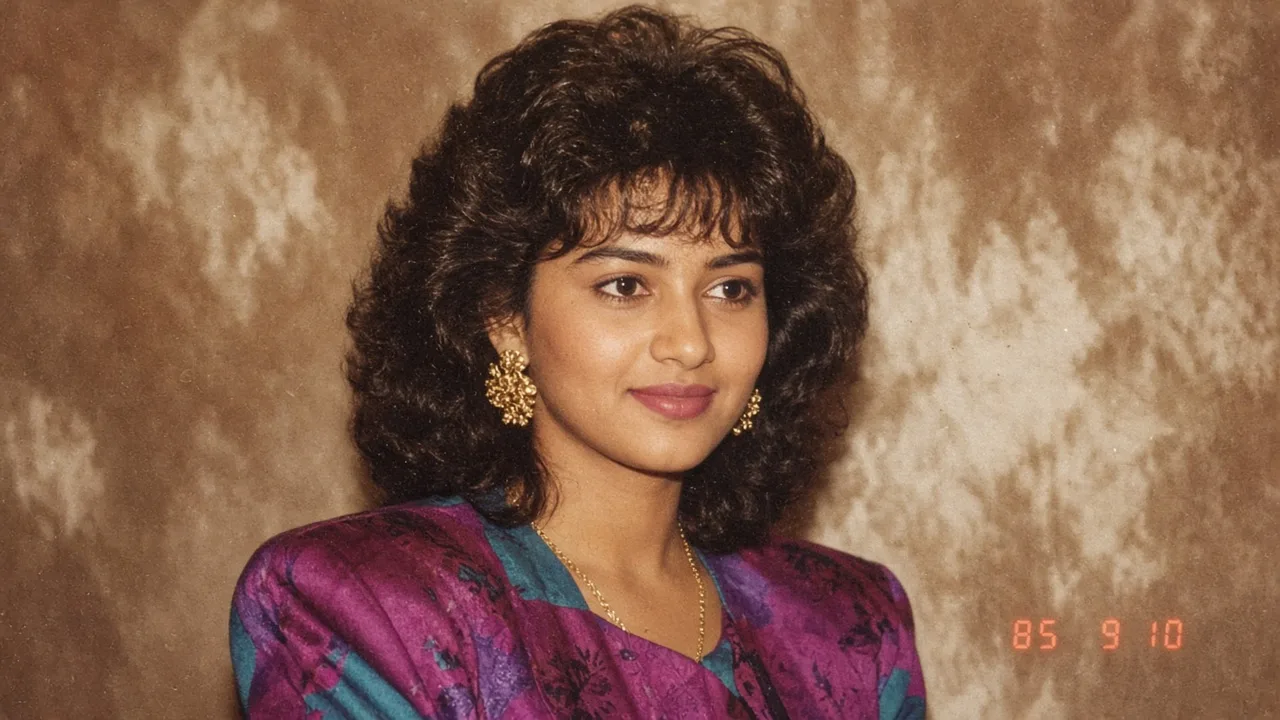
What #80sTrend actually is
In the second week of September 2026, Instagram Stories filled with portraits that look like they spent forty years in a drawer: big hair, padded shoulders, studio flash, analog grain, and a red-orange date stamp. Mashable India (9 September) traced the wave to a 1985 restyle prompt in ChatGPT’s Images tab. Hindustan Times, Firstpost, Business Today, and India Today reported the same mechanic the same day: upload a current photo, keep the face, rebuild the decade.
That is why a VSCO fade fails. The trend is not “add grain to a selfie.” It is a new photograph of you in 1985. The clothes, hair, jewellery, furniture, lighting, and film stock have to belong to the decade. Indian feeds lean Bollywood studio portraits and family-album candids; other feeds lean disco, Hollywood glamour, Stranger Things denim, or vinyl-era album covers.

Why the 80s look is going around now
Nostalgia was already in the feed. The 80s prompt made it personal: you, not a stock extra, in your parents’ decade. Firstpost and India Today both note the share loop—Reels, Stories, and Instagram’s Add Yours sticker—after earlier AI photo waves such as Ghibli restyles. Indian coverage keeps returning to millennial family albums and 1980s cinema because those pictures are the reference, not a generic Western disco pack.
The other reason it spread is mechanical. ChatGPT published a ready-made 1985 prompt. People did not have to invent lighting language. They tapped a style, attached a face, and posted. The prompt is public. The job does not belong to one chat tab.
Filter vs restyle vs AshnaAI
Three different products get lumped together as “80s AI.” Only one of them matches the viral screenshots.
| Need | Vintage filter | Text-only 80s prompt | AshnaAI with your photo |
|---|---|---|---|
| Your face | Unchanged selfie | Often a lookalike | Reference photo, identity locked |
| Clothes and hair | Still 2026 | 1980s, random person | 1980s on your body |
| Film look | Preset fade | Can be cartoon-aged | Grain, flash, date stamp on request |
| Next step | Export from the camera app | Download and leave | Convert, resize, or post in the same chat |
How AshnaAI is different—and better for this job
The market default this week is: open ChatGPT Images, tap the 80s style, download, jump back to Instagram. That works for one picture. It still splits the rest of the job—resize, JPG, a LinkedIn post, a second variation, a video from the still—across other tabs.
AshnaAI is different because the selfie never has to leave chat. Attach the photo, ask for an image-to-image 1985 restyle, and the image catalog routes to a model that can take a reference picture rather than inventing a stranger. How to generate an image is the generic path. This trend is the same tool with a reference photo and a decade lock. It is better when you want two or three takes, a 4:5 Stories crop, then resize or PNG to JPG without exporting to a third editor. Hub: AI image and video generator.
It is not a ChatGPT Images clone and it is not an Instagram sticker. If you only need the Add Yours chain, any generator that accepts a face photo will participate. If you need the file, the variations, and the next artifact in one login, generate it in AshnaAI chat.
How to generate a realistic #80sTrend photo
Start at app.ashna.ai/signup, then open chat. Attach one clear photo. A well-lit, front-facing head-and-shoulders frame beats a nightclub selfie, a group crop, or a screenshot of a screenshot.
Ask in plain language. You do not need to name a model. Say that the attached photo is the identity source, that the output must be a real 1985 photograph, and which sub-look you want. Then paste one of the prompts below, or write your own with the same locks: face, skin tone, age, analog grain, no modern objects, no sepia.
- Attach a recent photo with an unobstructed face.
- State the year (1985) and the sub-look (Bollywood studio, family album, Hollywood, disco, album cover).
- Lock identity: facial features, skin tone, age. Ban beautify, slim, and cartoon ageing.
- Ask for analog 35mm grain, direct flash or warm studio light, faded colour, and a red-orange date stamp.
- Ask for 4:5 if the destination is Instagram portrait, or 9:16 for Stories.
- Request two or three variations. Keep the take where the face still looks like you.
- Download the HTTPS image. Convert or resize in the same chat if you need a specific file type or pixel size.
Prompts that hold a face
The circulating ChatGPT prompt, published in Mashable India and Business Today, is a 1985 identity-preserving restyle with analog grain and a date stamp. The versions below are written for AshnaAI chat: they assume the photo is already attached, and they add the failure modes that make viral 80s pictures look fake.
Using my uploaded photo, show me what I would have looked like around 1985. Preserve my identity: facial features, skin tone, age, and recognisable appearance. Do not beautify, slim, or age the face. Reimagine hair, clothing, accessories, and surroundings with unmistakably mid-1980s styling—expressive silhouettes, statement accessories, layered details, and period colours. Make it feel like a genuine 1985 photograph: analog 35mm grain, slightly faded colour, direct flash, and subtle softness. Add a period-accurate red-orange date stamp in the lower corner. No modern phones, logos, watermarks, or extra text. Photorealistic, not cartoon, not a vintage Instagram filter.Turn this uploaded photo into an authentic 1980s Bollywood film-inspired studio portrait. Keep my natural facial features and skin tone. Add period-appropriate 1980s Indian clothing, voluminous hair, statement jewellery, warm studio lighting, soft focus, subtle film grain, and slightly faded colour. Make it look like a real photograph taken in India in 1985. Avoid sepia, heavy ageing, or a cartoon look.Recreate this uploaded photograph as an Indian family-album snapshot from the mid-1980s. Keep the same face and skin tone. Use everyday period clothes and hair, a simple indoor setting, cheap flash, realistic film colours, and analog grain. It should look candid, not like a magazine cover.Turn this uploaded photo into a glamorous 1980s Hollywood studio portrait. Keep my face recognisable. Add period hair, makeup, and clothing, dramatic studio lighting, soft focus, saturated colour, and subtle film grain. No modern objects.Reimagine me from this uploaded photo as a character in a 1985 small-town setting, Stranger Things style. Preserve facial features and identity. Add period hair, denim or a retro jacket, moody neon-tinted lighting, and cinematic film grain. Photorealistic, not a TV still with logos.Turn my uploaded photo into a 1985 music-album cover portrait. Keep my face recognisable. Add bold retro styling, dramatic studio lighting, saturated colours, a glossy vinyl-era photographic texture, and a red-orange date stamp in the lower corner.What makes a take look real
The pictures that spread are boring in the right ways. They look like a print, not a render. Keep the list short when you refine.
- Identity first. If the jaw, eyes, or skin tone drifted, do not keep generating outfits. Say keep this exact face and regenerate.
- Period wardrobe, not a costume-shop collage. One era-correct outfit beats neon, a mullet, and three unrelated props.
- Lighting from one source. Direct flash or warm tungsten studio light. Mixed neon plus golden-hour plus ring light reads as 2026.
- Analog grain and mild fade. Not sepia, not cracked Polaroid borders, not “old photo overlay” frames.
- A small red-orange date stamp, if you want the ChatGPT-app look. Ask for no other text.
- No modern objects: AirPods, smartwatches, LED strips, logo walls, phones.

When the first image misses
Stay on the same thread. The attached selfie is already the reference. Name the one thing that is wrong: “keep this face, swap the saree for a 1985 printed shirt,” or “remove the sunglasses, keep the date stamp.” Asking for a brand-new 80s person from text only will throw away the identity you just locked.
If you need a clip instead of a still, generate the portrait first, then follow How to generate a video with that image. If the destination is LinkedIn, generate, then use the HTTPS image URL on How to post on LinkedIn. Broader design and ads video stay on AI design and video generator.
Generate your 1985 portrait
Open AshnaAI chat, attach the photo, and paste the core prompt. Ask for two 4:5 variations. Keep the take where your face still looks like you. New accounts start at app.ashna.ai/signup.
Frequently asked questions
- What is the #80sTrend AI photo?
- It is a September 2026 Instagram wave where people upload a recent photo and ask an image model to rebuild it as if it were shot in the 1980s. Hair, clothes, lighting, backdrop, and film grain change. The face is supposed to stay yours. Coverage on 9 September 2026 from Mashable India, Hindustan Times, Firstpost, and Business Today describes that as the ChatGPT 80s photo trend, spreading through Stories and Add Yours stickers.
- Why does a vintage filter look fake next to this trend?
- A filter tints a 2026 selfie. The trend rebuilds the decade: padded shoulders, voluminous hair, studio flash, analog grain, faded colour, and often a red-orange date stamp. If the clothes and lighting still look like a phone camera, it will not read as 1985.
- How do I generate a realistic 80s photo in AshnaAI?
- Open https://app.ashna.ai/chat attach a clear selfie, and ask to restyle that photo as a 1985 portrait while preserving facial features, skin tone, and age. Name a specific look and ask for analog grain rather than sepia. Then download the file. The generic image how-to is https://www.ashna.ai/blogs/how-to-generate-an-image-in-ashna-ai
- Do I have to use ChatGPT for the 80s photo trend?
- No. The viral posts happened because ChatGPT’s Images tab shipped a 1985 restyle prompt. The job itself is image-to-image generation from a selfie. AshnaAI does that in chat, on an image catalog that can restyle from a reference photo, then lets you convert, resize, or reuse the HTTPS URL in the same thread.
- What photo should I upload?
- A recent, well-lit, front-facing picture with a visible face and a simple background. Avoid sunglasses that hide the eyes, heavy beauty filters, and tiny crops. For a couple or group, say how many people and that every face must stay recognisable.
- Will my face stay mine?
- Only if the prompt says so. Lock identity, facial features, skin tone, and age. Ban beautifying, slimming, and cartoon ageing. If the first take drifts, reply with the generated image still in thread and say keep this exact face.
- Is uploading a selfie to an image model private?
- You are sending a face photo to generate a new picture. Use a photo you are willing to upload. AshnaAI’s published privacy terms are at https://www.ashna.ai/policy This page does not invent a retention promise beyond that policy.
Tags
Related
Try this in AshnaAI. Create a free account.
Found this article helpful? Share it with your network.