
How to use the AshnaAI API in VS Code
Create an AshnaAI API key, then add a Custom Endpoint in VS Code Language Models. Chat and agent turns use the OpenAI-compatible catalog: paste the Bearer key, set the base URL to https://api.ashna.ai/v1/api, and pick a catalog id such as glm-5.3-flash.
AshnaAI
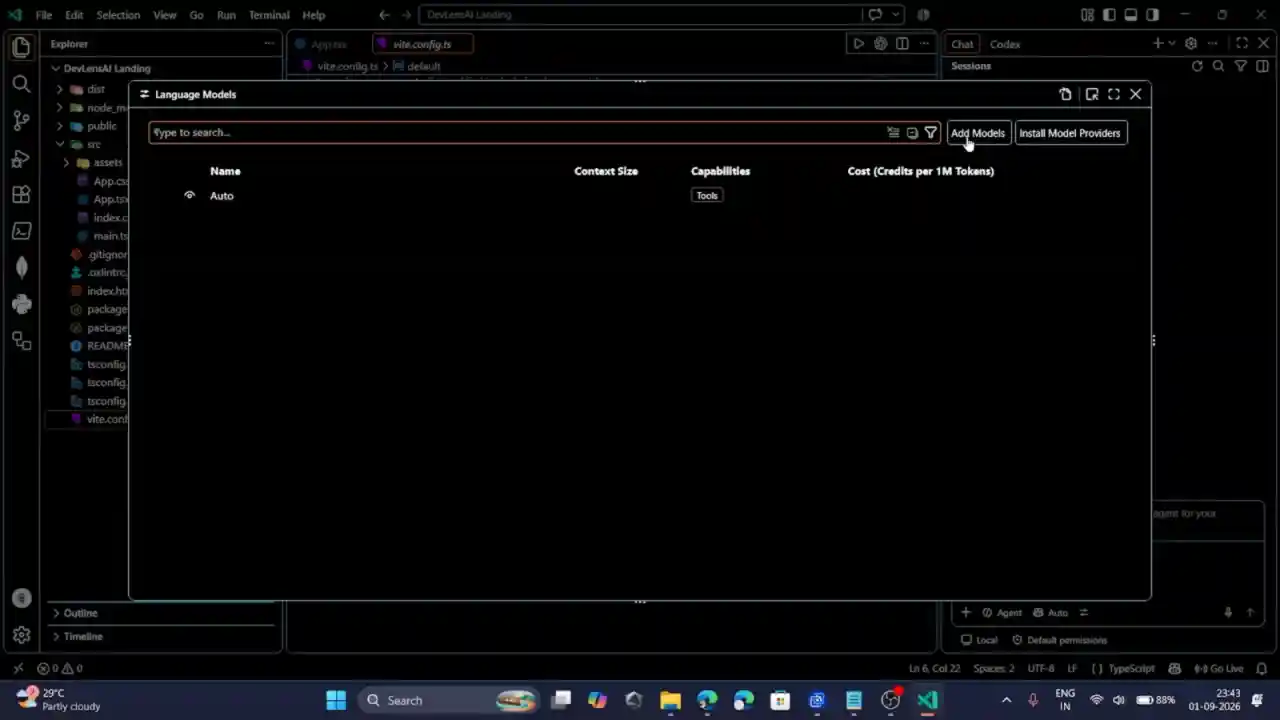
Watch the VS Code setup
The clip below is the Language Models overlay in VS Code: Add Models is the control that starts a Custom Endpoint. Someone who already has a key can follow the clicks, then return here for the exact URL and model id.
Step 1: Create an AshnaAI API key
The editor needs a Bearer token before it can list or call catalog models. Open Account → API. Create key asks for a name—VS Code is enough. The secret is shown once. It is sent as Authorization: Bearer. It does not belong in git, a gist, or a recorded screen.
Step 2: Open Language Models in VS Code
In the Chat view, open the model picker and choose Manage Language Models. The Command Palette command is Chat: Manage Language Models. The Language Models editor opens as a modal over the editor—the same overlay as the video. Official notes: AI language models in VS Code.
Step 3: Add a Custom Endpoint
Select Add Models, then Custom Endpoint. That provider is the OpenAI-compatible path. Group name: AshnaAI. API type: chat-completions. Base URL: https://api.ashna.ai/v1/api Paste the key into the secret field VS Code stores locally.
When the provider URL is https://api.ashna.ai/v1/api model discovery uses GET /v1/api/models—the same list as How to call any catalog model through the API. A model can also be written by hand in chatLanguageModels.json with vendor customendpoint, id glm-5.3-flash, and url https://api.ashna.ai/v1/api/chat/completions
Step 4: Pick a catalog id
After the provider saves, the Chat model picker lists the catalog rows VS Code discovered. glm-5.3-flash is the usual coding pin. Other ids work the same way: change only the model string. Confirm ids on model and agent ids or list models.
Tool-calling models stay available for agent chat. If a newly added row does not appear, Microsoft’s docs say restart VS Code once.
Fields that have to match
These are the values the Custom Endpoint must send. A typo on the base URL is the usual failure: https://api.ashna.ai without /v1/api points at the wrong path.
| Field | Value |
|---|---|
| Provider | Custom Endpoint |
| Group name | AshnaAI |
| API type | chat-completions |
| Base URL | https://api.ashna.ai/v1/api |
| Auth | Bearer key from Account → API |
| Example model id | glm-5.3-flash |
| Completions URL | https://api.ashna.ai/v1/api/chat/completions |
Try it now
Create a key in Account → API, then add the Custom Endpoint in VS Code. HTTP examples live on AshnaAI API docs and chat completions. To try Flash in the product UI first, open GLM-5.3-Flash in chat.
Frequently asked questions
- How do I create an AshnaAI API key?
- Open Account → API, choose Create key, give it a name, and copy the secret. That string is the Bearer token. Do not put it in a public repo or a screenshot.
- What base URL does VS Code need?
- https://api.ashna.ai/v1/api Custom Endpoint discovery then calls GET /v1/api/models. A model URL can also be the full chat-completions path: https://api.ashna.ai/v1/api/chat/completions
- Which VS Code command opens the Language Models editor?
- Chat: Manage Language Models. The same editor opens from the gear on the Chat model picker. The walkthrough video on this page shows Add Models on that overlay.
- Can VS Code Chat use GLM-5.3-Flash through this API?
- Yes. After the Custom Endpoint is saved, pick glm-5.3-flash in the Chat model picker. The same id works in curl. Product chat pin: app.ashna.ai/chat?agent=glm-5.3-flash.
- Is a GitHub Copilot plan required for a Custom Endpoint?
- Microsoft’s Language Models docs say Bring Your Own Key works for chat without a Copilot plan. Some editor features still expect a GitHub account. The AshnaAI route is the Custom Endpoint, not a Copilot SKU.
Tags
Related
- AshnaAI for Work
- AshnaAI vs ChatGPT
- AshnaAI vs Claude
- Large Language Model (LLM)
- Foundation Model
- pin glm 5 3 flash for coding
- glm 5 3 flash vs gpt 5 6 terra
- glm 5 3 flash vs gpt 5 6 sol
- glm 5 3 flash vs claude fable 5
- glm 5 3 flash vs claude opus 5
- glm 5 3 flash vs kimi k3
- how to call any catalog model through the api
- how to use the ashna ai api in claude code
- how to use the ashna ai api in cursor
- how to use the ashna ai api in openclaw cline and codex
- cheapest coding ai vs claude opus 5 and gpt 5 6 sol
- reduce llm api cost 95 percent
- how the dynamic model router cuts ai cost
- how to use ashna x1 instead of picking models yourself
- ashna x1 task aware model routing
Try this in AshnaAI. Create a free account.
Found this article helpful? Share it with your network.